Every DOM Element Casts a Shadow
Shadow DOM gives your components their own isolated world—scoped styles, encapsulated markup, and a boundary that keeps everything in place.
Last updated: May 18, 2026
Actually, not “every element”—allow me to explain. Websites consist of HTML elements like <article> or <div> that create a tree-like structure called the Document Object Model (DOM). We can call it the regular or light DOM. It's probably clear to you. But those elements can have a dark counterpart—the shadow DOM.
What is shadow DOM?
Shadow DOM is the second pillar of web components. To see the first, check my prior post—Intro to Web Components—What Are Custom Elements?
Shadow DOM is an opt-in encapsulation mechanism. Think of it as a way to create a private DOM tree where internals are hidden from JavaScript or CSS on the page. Shadow DOM can have two sources:
- User-created shadow DOM. You explicitly attach a shadow root to an element using the Shadow DOM API.
- Browser-internal shadow DOM. Some built-in elements, like
<input>or<select>, use an internal shadow DOM created by the browser.
What elements cast a shadow DOM?
Not “every,” but many of the HTML elements can host shadow DOM. We can distinguish two categories here that connect to the sources above:
- Custom elements. Any valid custom autonomous element can have its shadow DOM. It's a primary use case—your own custom components. My previous post explained custom elements in detail.
- Built-in elements. There is a list of specific built-in HTML elements that support shadow DOM. Those are elements like
<article>,<div>,<span>, or<section>. There is a list of all elements that support shadow DOM.
What does shadow DOM provide?
Why would we use it, besides the cool name? Shadow DOM provides some key features for web components:
- DOM encapsulation. The shadow tree is isolated from the main document. Elements inside cannot be accessed via standard DOM traversal methods like
document.querySelector(). We can even block direct JavaScript access to the shadow root using theclosedmode. - Encapsulation of styles. CSS styles are clearly separated between such a component and page. It can prevent accidental style leaking.
- Slots. The shadow tree supports placeholders called “slots” where light DOM content can be projected.
- Event retargeting. Events from the shadow root are accessible from the outside, but they are retargeted. It means that when they bubble out of the shadow root, their target is changed to the host element, hiding the internal element that actually triggered it.
Two syntaxes of shadow DOM
Currently, there are two ways to create a shadow DOM.
- Imperatively in JavaScript by calling the
attachShadow()method. - Declaratively in the HTML markup. This is a newer addition to the web platform.
I don't like making cliffhangers like in corny docusoaps, so I described the declarative approach in more detail in the next post. Here, I'll expand on the original method.
const host = document.querySelector('#my-element')
const shadow = host.attachShadow({ mode: 'open' })

shadow.innerHTML = `<p>Hello from the shadows</p>`
You can call the attachShadow() method on any supported host element and pass an option object. In the example above, we attached the paragraph to the my-element host. The method returns a ShadowRoot—it's a special DocumentFragment that acts as a root of a shadow tree. As you see, you can populate the tree similarly to the regular DOM by using properties and methods like innerHTML or appendChild(). Once attached, the shadow tree replaces the host's children in rendering (unless you use slots to project them back in).
Shadow DOM modes
The only required setting is mode. There are two options here:
mode: 'open':element.shadowRootreturns theShadowRootobject. External code can read and modify the shadow tree.mode: 'closed':element.shadowRootreturnsnullinstead of the shadow root. The host internals are hidden from the outside JavaScript code.
Blocked JS queries don't mean that the closed mode is completely secure. Shadow DOM components still share the same JS execution context. If you need a security boundary for an untrusted third-party script, use an <iframe>. Shadow DOM is about encapsulation—it's not a security measure.
Shadow DOM optional settings
Besides setting the mode, you can control other behaviors of the shadow DOM root with additional options:
delegatesFocus: The option can help control focus behavior for your components. When set totrue, clicking anywhere on the host element or using JavaScript to set focus to the host automatically focuses the first focusable element inside the shadow DOM.slotAssignment: Controls how light DOM children get assigned to<slot>elements. The default"named"mode automatically matches children to slots based on theirslot="name"attribute. The"manual"mode disables this automatic matching—instead, you explicitly assign elements usingslot.assign(element)in JavaScript. It gives you control over which content goes where.clonable: Whentrue, cloning the host element (viacloneNode()orimportNode()) also includes the shadow root.falseby default—normally cloning a host produces a copy without its shadow tree.serializable: Whentrue, the shadow root can be serialized to HTML usingelement.getHTML({ serializableShadowRoots: true }). This bridges the imperative and declarative worlds—you can create a shadow root in JS, then export it as HTML containing a<template shadowrootmode>.
Shadow boundary
As we saw, shadow DOM isolates its internals from the rest of the document. Think of it as some kind of wall between the shadow and regular DOM. This wall has a name—a “shadow boundary.” It sounds cool too, right? Like some DLC to Elden Ring. Either way, the shadow boundary is a boundary between the light and shadow DOM, created while attaching a shadow root to a host element. The boundary is an encapsulation mechanism that enforces separation at three main levels: CSS, DOM, and events.
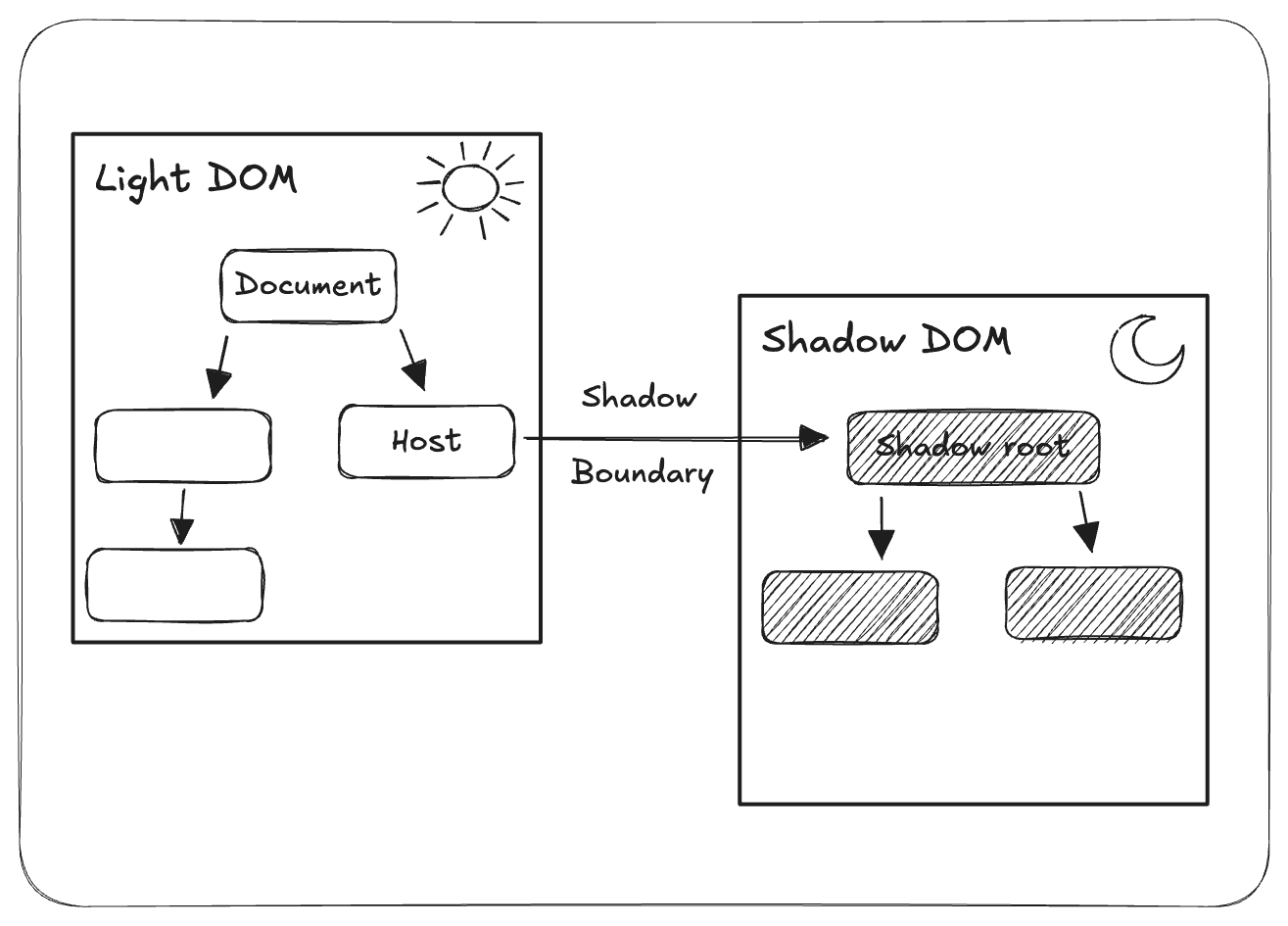
Encapsulation doesn't mean that everything is isolated. Some things intentionally cross the shadow boundary. We'll explain those levels in detail because it's not so obvious what crosses the boundary and what does not. Instead of imagining a solid wall, you can imagine a brick wall with some deliberate cracks here and there.
CSS and shadow boundary
Global CSS selectors can't cross the shadow boundary in either direction—your page styles won't affect shadow DOM internals, and shadow styles won't leak out. It's a massive advantage of using shadow DOM. Non-inherited CSS properties don't cross the boundary as they are not inherited in the light DOM either. However, inherited CSS properties like color and font-family flow through naturally, since top-level shadow tree elements inherit from their host.
CSS custom properties pierce the boundary by design, making them the recommended way to style web components. Additionally, ::part() and ::slotted() pseudo-elements act as controlled escape hatches, letting the component author explicitly decide which internal elements can be styled from outside.
| What? | Crosses? | Notes |
|---|---|---|
Global selectors (div, .class, #id) | No | These selectors don't reach into or out of shadow trees. |
Non-inherited properties (background, border, etc.) | No | Standard CSS behavior—these properties don't inherit in any DOM. |
Inherited properties (color, font-family, etc.) | Yes | Top-level shadow tree elements inherit from the host. |
CSS variables (--my-var) | Yes | Intentionally cross the boundary. Recommended theming mechanism. |
::part() | Depends | Only if the component author explicitly exposes elements with part="name". |
::slotted() | Depends | Styles direct slotted light DOM elements (no descendants). |
Deprecated combinators like /deep/ and ::shadow have been removed from all browsers.
DOM and shadow boundary
Standard DOM queries like document.querySelector() can't reach into shadow roots—the boundary scopes them out entirely. To access shadow DOM internals, you need to go through element.shadowRoot.querySelector(), and even that only works for open shadow roots. IDs are scoped to their shadow root too, meaning you can safely reuse the same ID across multiple components without collisions. The one exception to this encapsulation is <slot>—it projects light DOM children into the shadow tree for rendering purposes, though technically those elements still live in the light DOM. If that sounds complicated, don't worry—we'll learn more about slots in the following section.
| What? | Crosses? | Notes |
|---|---|---|
| ID scoping | No | IDs inside the shadow DOM are scoped to that root. |
document.querySelector() | No | It cannot find elements inside shadow roots. |
element.shadowRoot | Depends | Returns ShadowRoot in open mode, and null in closed mode. |
shadowRoot.querySelector() | Depends | It works only for mode: "open" shadow roots. |
<slot> content projection | Yes | Light DOM children are rendered into the shadow tree but remain in the light DOM. |
Events and shadow boundary
Most user interaction events cross the shadow boundary (with some non-composed/non-bubbling exceptions). Custom events by default don't cross the shadow boundary, but you can customize them to do so. When you set the composed option to true, events propagate through the shadow boundary. The bubbles: true option enables propagation through the parent-child hierarchy in both DOM types.
| What? | Crosses? | Notes |
|---|---|---|
load, unload, abort, error, select | No | Non-composed. |
change, submit, reset | No | Non-composed (unlike input). Re-dispatch them from the host if outside code needs them. |
mouseenter, mouseleave, pointerenter, pointerleave | No | Non-composed. The host receives its own separate event when the pointer enters it. |
slotchange | No | Bubbles but is non-composed. |
focus, blur | Partly | Composed but non-bubbling—they reach the host (retargeted), but not its ancestors. |
Most UI events (click, keydown, input, etc.) | Yes | Composed and bubbling—they propagate across the boundary. |
Custom events (new CustomEvent(...)) | Depends | composed: true is required to cross the boundary. Add bubbles: true if it should also bubble up. |
Even if the event crosses the boundary, event.target is changed to the host element to encapsulate implementation details. The event.composedPath() method returns all the nodes the event propagates through unless the shadow root mode is set to closed—then it omits the shadow tree internals.
| What? | Crosses? | Notes |
|---|---|---|
event.target (retargeting) | Yes | When an event crosses the boundary, target is retargeted to the host element. |
event.composedPath() | Depends | Returns the full path through shadow boundaries (in open mode). |
ARIA and shadow boundary
Unfortunately, accessibility is the biggest pain point here. As we saw, IDs are scoped, which prevents cross-boundary referencing. For now, the only partial solution is the ariaLabelledByElements property. It's a JS property that accepts element references, bypassing the scoping problem. It's supported by major browsers since 2025, but it has limitations—the referenced element must be in the same or an ancestor shadow root, and it doesn't work with server-side rendering. So, overall, there is no clean solution yet. There is a reference target proposal, so the web ecosystem is working toward a clean solution.
| What? | Crosses? | Notes |
|---|---|---|
aria-labelledby | No | ID references are scoped to their shadow root. |
aria-describedby | No | Same scoping issue as aria-labelledby. |
for (label) | No | The <label for="id"> association fails if the <input> is inside a shadow root. |
ariaLabelledByElements | Depends | It's a property that accepts element references instead of ID strings, bypassing the scoping problem. But it only works when the referenced element is in the same or an ancestor shadow root. |
There is a lot to take in, and you shouldn't try to memorize every detail. You can consider a shadow boundary to be a one-way mirror. Inherited styles or CSS variables flow inward, so a web component can be styled. Some events can flow outward but with retargeting to hide internals. Standard DOM queries are blocked completely. It causes issues with accessibility, but there are solutions on the horizon.
Content projection with slots
The shadow tree replaces the host's children while rendering. Without any mechanism to bypass this behavior, we couldn't have dynamic content—everything would be hardcoded in the shadow tree. Content projection is that mechanism.
Content projection is the process of taking light DOM children and rendering them at specific places inside the shadow tree. The <slot> element is the tool that makes this work. It acts as a placeholder for the light DOM children inside the shadow tree. During composition, the browser looks at the host's light DOM children and places them into matching slots. As a result, the user sees the flattened DOM of all of those elements. Let's update our previous diagram with slots.
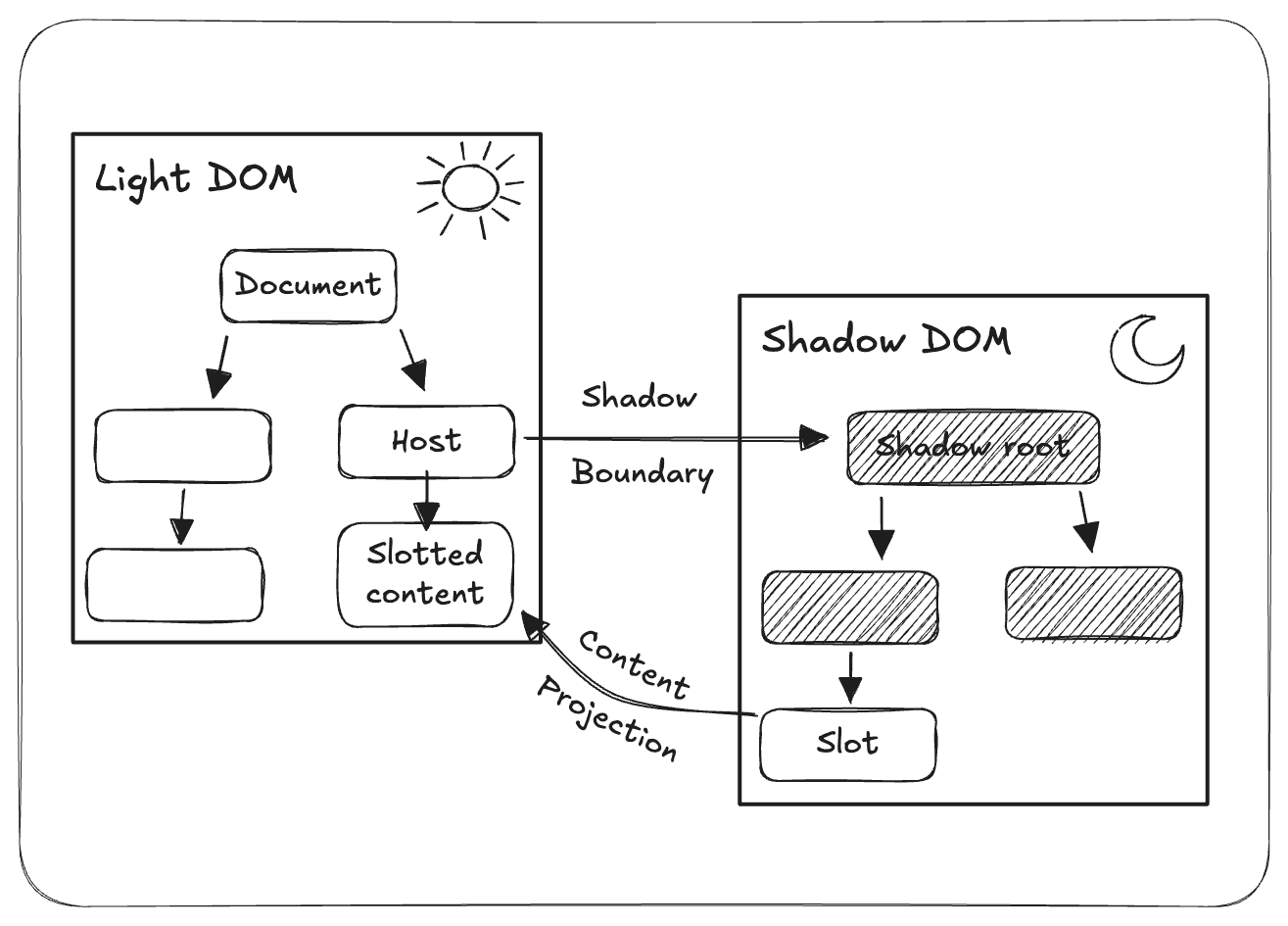
Slotted elements stay in the light DOM—they're not in the shadow tree. They're just rendered at the slots' positions. It matters because slotted elements are styled by the page's CSS, not the shadow tree's scoped styles.
Types of slots
If you're looking for some analogy, slots are similar to props.children in the React world. Additionally, Vue's slot system was inspired by the shadow DOM slot spec. And similarly, there are two types of slots:
- Default
- Named
Default slots
The default slot is a <slot> element without a name attribute. It catches all light DOM children without a slot attribute. Conceptually, it works the same way as the rest parameter, which collects the remaining arguments (...rest).
<!-- Shadow tree (component's internal template) -->
<div>
  <slot>A default value</slot>
</div>

<!-- Usage (what the consumer writes) -->
<my-card>
  <p>This ends up in the default slot</p>
  <p>So does this</p>
</my-card>

<!-- Flattened DOM (what the browser renders) -->
<my-card>
  <div>
    <p>This ends up in the default slot</p>
    <p>So does this</p>
  </div>
</my-card>
If <my-card> had no children, “A default value” would render instead. And if there are multiple unnamed slots, only the first one receives content—the rest are ignored.
Named slots
A <slot> with a name attribute becomes a named slot. It allows you to control where exactly content is placed. Light DOM children target it using a matching slot attribute. Each child is projected to its matching named slot.
<!-- Shadow tree (component's internal template) -->
<header>
  <slot name="title">Default title</slot>
</header>
<div>
  <slot name="content"></slot>
</div>
<footer>
  <slot name="actions"></slot>
</footer>

<!-- Usage (what the consumer writes) -->
<my-card>
  <h2 slot="title">Hello</h2>
  <p slot="content">Some text here</p>
  <button slot="actions">Click me</button>
</my-card>

<!-- Flattened DOM (what the browser renders) -->
<my-card>
  <header>
    <h2>Hello</h2>
  </header>
  <div>
    <p>Some text here</p>
  </div>
  <footer>
    <button>Click me</button>
  </footer>
</my-card>
Both slot types support default values, which act as fallbacks in case of missing light DOM children. The fallback can be anything: text, elements, or even nested components. Additionally, both types can be used together.
<!-- Shadow tree -->
<header>
  <slot name="title">Default title</slot>
</header>
<div>
  <slot></slot>
</div>

<!-- Usage -->
<my-card>
  <h2 slot="title">Custom title</h2>
  <p>This goes to the default slot</p>
  <p>So does this</p>
</my-card>

<!-- Flattened DOM -->
<my-card>
  <header>
    <h2>Custom title</h2>
  </header>
  <div>
    <p>This goes to the default slot</p>
    <p>So does this</p>
  </div>
</my-card>
Slots API
Slots don't have to be static—there is an API for you to interact with them.
slot.name: The slot's name for named slots. It's an empty string for default slots.slot.assignedNodes({ flatten: false }): Returns all the light DOM nodes assigned to a particular slot. With{ flatten: true }option, it also resolves nested slots and returns fallback content when nothing is assigned. Theflattenoption defaults tofalse.slot.assignedElements({ flatten: false }): It works the same as the above method but is limited to element nodes only (without text type). Theflattenoption also works the same.element.assignedSlot: The reverse—given a light DOM element, the property returns which<slot>it's assigned to. Returnsnullif unslotted or if the shadow root is closed.slot.assign(node1, node2, ...): Manually assigns nodes to the slot. The shadow root must be created with the optionslotAssignment: "manual"for this method to work. Throws an error if called on an automatic slot.slotchange(event):<slot>fires this event when its assigned nodes change (added, removed, or reassigned). It does not fire when content inside a slotted node changes.
slot.addEventListener('slotchange', (e) => {
  const assigned = e.target.assignedElements()
  console.log('Slot now contains:', assigned)
})
The slotchange event can fire during HTML parsing before connectedCallback, so you need to have appropriate guard logic in your handlers.
Styling shadow DOM
While styling shadow DOM components, you need to have two perspectives in mind.
- Styling from the inside: How you as the author style components.
- Styling from the outside: How you provide an API for consumers to customize their appearance.
Styling from the inside
The author creates web components. As the author, you know the component's internals and control what's exposed to the outside. Your components should expose styling APIs and define what can be changed (and what can't). The below tools reflect this abstraction in their design.
The :host pseudo-class allows you to style a custom element (shadow host).
:host {
  display: block;
  padding: 16px;
  border: 1px solid gray;
}
The functional form lets you style hosts conditionally, based on attributes, classes, or states.
:host([disabled]) {
  opacity: 0.5;
  pointer-events: none;
}

:host(.dark) {
  background: #333;
  color: white;
}
Another pseudo-class, :host-context(), allows styling based on what's in the light DOM above. In the example below, a dark background is applied only when any of the ancestors has the dark theme class.
:host-context(.dark-theme) {
  background: #333;
}
At the time of writing, the :host-context() pseudo-class is not supported in Safari or Firefox. You can check current support here.
There is also a way to style slotted content mentioned earlier. The ::slotted() pseudo-element targets those light DOM children that have been projected into slots.
::slotted(h2) {
  color: navy;
  margin: 0;
}

::slotted([slot='title']) {
  font-weight: bold;
}
The ::slotted() pseudo-element only supports simple selectors—no combinators or chaining. So, for example, combined selectors like ::slotted(article h2) or ::slotted(h2) span won't work.
To let consumers style components' internals, you expose elements with the part attribute—we'll cover this in the next section.
Styling from the outside
The consumer uses web components. As the consumer, you don't need to know the component's internals. They are black boxes. You can use the exposed API to customize those components without the need to know implementation details.
In the CSS and shadow boundary section, we saw that properties like color, font-family, font-size, and line-height flow into the shadow tree automatically. The component can block this with :host { all: initial; }. However, all: initial doesn't reset custom properties. Blocking inheritance entirely is usually not recommended either.
CSS custom properties, a.k.a. CSS variables, however, are the recommended way to style web components. As I mentioned earlier, they pierce the shadow DOM.
/* Consumer sets the variable */
my-card {
  --card-bg: #f0f0f0;
  --card-padding: 16px;
}

/* Component uses it internally */
:host {
  background: var(--card-bg, white);
  padding: var(--card-padding, 8px);
}
The component author can mark internal elements with the part="name" attribute, while the consumer can target them with the ::part() pseudo-element. You can style exposed component internals using this syntax.
<!-- Inside shadow tree -->
<header part="header">...</header>
<div part="body">...</div>/* Consumer styles the exposed parts */
my-card::part(header) {
background: navy;
color: white;
}
my-card::part(body):hover {
opacity: 0.8;
}The ::part() pseudo-element has similar limitations to ::slotted(). For example, it doesn't allow chaining like ::part(header) span. Unlike ::slotted(), it supports pseudo-classes like :hover and pseudo-elements like ::before. It's an intentional limitation to preserve the abstraction.
The ::part() syntax works only one level deep. To style an inner component from the outer one, use the exportparts attribute. It explicitly forwards specific inner parts so they are accessible from the outside. exportparts works similarly to props forwarding in React.
<!-- inner-card's shadow tree -->
<header part="header">Title</header>
<div part="body">Content</div>

<!-- outer-card's shadow tree -->
<div part="wrapper">
  <inner-card exportparts="header, body"></inner-card>
</div>/* Now the consumer can style inner-card's parts through outer-card */
outer-card::part(header) {
color: navy;
}
outer-card::part(body) {
padding: 16px;
}
outer-card::part(wrapper) {
border: 1px solid gray;
}Additionally, you can rename parts as you forward them. Here we can make an analogy to named re-exports in JavaScript modules. With such a mapping, you're avoiding name collisions.
<!-- outer-card's shadow tree -->
<header part="header">Outer header</header>
<inner-card exportparts="header: inner-header"></inner-card>/* Now they're distinct */
/* Outer's own header */
outer-card::part(header) {
}
/* Inner's forwarded header */
outer-card::part(inner-header) {
}Main ways to style web components
There are two main ways to style web components (there are many twos in this post, sheesh).
- Style elements.
- Constructed stylesheets.
Style elements
The most straightforward approach is to add <style> tags directly in the shadow tree. Such styles are automatically scoped. If you used Styled Components, this syntax will feel familiar (although they don't work the same).
shadow.innerHTML = `
  <style>
    p { color: red; }
    .card { border: 1px solid gray; }
  </style>
  <div class="card"><p>Hello</p></div>
`
Even generic selectors, like p in the example above, target elements only inside this shadow root.
Constructed stylesheets
You can also create stylesheets in JavaScript and then add them to a particular shadow root (or document). First, create a stylesheet using the CSSStyleSheet constructor, replace its content with custom styles, and finally assign it to the shadow root using the adoptedStyleSheets property.
const shared = new CSSStyleSheet()
shared.replaceSync(`
  :host { display: block; }
  p { color: red; }
`)

shadow.adoptedStyleSheets = [shared]
The property takes an array, so you can assign multiple stylesheets to a single shadow root. This syntax solves a duplication problem—components no longer need to have similar styles in their own <style> tags. Multiple components can share a stylesheet object with common styles.
CSS module imports
There is also a modern improvement to the previous approach. You can load external CSS files as modules instead of creating them in JavaScript. Import attributes and the with keyword tell the browser to interpret an imported file as a CSS module.
import styles from './my-card.css' with { type: 'css' }

shadow.adoptedStyleSheets = [styles]
Importing CSS files this way shouldn't be surprising—a similar syntax exists in frameworks or CSS modules.
Even though CSS import modules have many advantages over constructing stylesheets, there is a catch—browser support. Safari doesn't support CSS import attributes yet. If you need Safari support today, use a bundler like Vite.
Summary
In this post, we learned about shadow DOM—the second of three pillars of web components. Now you should know what the shadow DOM is, how to use it, and how it interacts with existing web technologies. The next post will focus on the new declarative syntax for shadow DOM and will wrap up our mini-series. If you're eager to learn more about shadow DOM, check the resources below.
- Using shadow DOM (MDN)
- Shadow DOM v1 (web.dev)
Element.attachShadow()(MDN)ShadowRoot(MDN)<slot>element (MDN)- Using templates and slots (MDN)
::part()(MDN)::slotted()(MDN):host(MDN)adoptedStyleSheets(MDN)Event.composed(MDN)ariaLabelledByElements(MDN)- Shadow DOM and accessibility: the trouble with ARIA (Nolan Lawson)
- Accessibility with ID Referencing and Shadow DOM (Cory Rylan)
- Styles Piercing Shadow DOM (Open Web Components)
- Removal of
/deep/and::shadow(Chrome blog)